
Clicks without enquiries
Visitors arrive from your ads, look around and leave without calling or filling in a form.
Google Ads management
People search on Google when they need something, which makes it one of the most direct ways to reach customers who are ready to act. But a click is not an enquiry. When ads show for the wrong searches, or the click lands on the wrong page, the budget goes quickly and the phone stays quiet. This page shows where Google Ads campaigns most often leak, and how to fix them.
Free e-book by our team
Google AdWords’ Golden Secrets
At a glance
Where you are now
How we do it
What you get
Does this sound familiar?

You set up Google Ads, chose some keywords and set a budget, perhaps with an agency. Clicks are coming in and money is being spent, but it is hard to say what you are getting for it, and the advice you hear most often is simply to spend more.
If any of the following sounds familiar, you are in good company:
Visitors arrive from your ads, look around and leave without calling or filling in a form.
The search terms report shows people looking for jobs, free versions or things you don’t sell.
When you raise the budget, the cost of each enquiry rises and the extra spend doesn’t bring proportionally more business.
The daily budget runs out quickly, and you can’t tell whether it went on your best searches.
Customers searching for exactly what you offer don’t seem to see your ads, while broad terms use up the budget.
Plenty of impressions, clicks and click-through rates, but no clear answer to how many enquiries the ads produced.
The cause is rarely a single setting. Google Ads rewards relevance at every step: the search, the keyword, the ad, the landing page and what happens after the enquiry. A weak link anywhere costs money.
These are patterns business owners often describe to us. They are not a verdict on your account; that needs a proper look at your campaigns and search terms.
The real cost
Every click is paid for, whether it was a good one or not. The larger costs are easier to miss.

An irrelevant click usually costs as much as a relevant one. Without regular search-term reviews, the same waste repeats every day.
Enquiries from people outside your area or market take time to answer and rarely become customers.
If only clicks are measured, budget goes to the keywords that attract traffic, not the ones that bring enquiries or sales.
Someone searching for exactly what you offer may land on a vague page, leave, and enquire with a competitor instead.
Why it happens
Each of these is common, and each one can be checked and corrected.
01
A keyword can look relevant but attract people who want information, jobs or something free. And when many unrelated keywords share one ad group, a single generic ad has to answer all of them.
Better: Group closely related keywords so each ad can speak directly to the search, and put most of the budget on searches that signal someone is ready to enquire or buy.
02
Broad and phrase match keywords can show your ads for searches you never intended.
Better: Review the search terms report regularly and add negative keywords for searches that will never become customers.
03
Ads that read like every competitor’s give searchers no reason to choose you, and a homepage makes them search again for what they just searched for.
Better: Write ads that answer the search with a specific benefit you can back up, then send each group of searches to a page that answers that need, builds trust and makes the next step obvious.
04
Clicks and click-through rates say little about calls, enquiries or sales.
Better: Track calls, form enquiries, bookings and purchases as conversions, so bidding and decisions are based on real outcomes.
05
Campaigns left unchanged tend to drift: costs creep up and lead quality drops without anyone noticing.
Better: Agree a review routine covering search terms, ads, landing pages and which enquiries became customers.
What good looks like
Google Ads rewards relevance and good measurement. A well-run account is built around both.
Before
Without a clear plan
After
With The Lion Kingdom
We can’t promise a particular number of leads or sales. We can make the process clearer, measurable and easier to improve.
How we help
Google Ads campaigns that put your business in front of people who are already searching for what you offer, run in your own Google Ads account and measured with conversion tracking.

We agree what each campaign should produce (calls, enquiries, bookings or sales) and plan the structure and budget split.
Keywords grouped by search intent, match types chosen carefully, and a look at how competitors advertise.
Negative keyword lists and a bidding strategy suited to your goal and the data available.
Ads written for each group of searches, with sitelinks, call and other assets where they help.
Account review, then Search campaigns first; Performance Max, Display or YouTube only where they suit your goals.
Recommendations for the page each campaign should send people to. We can build pages through our website design service if needed.
Conversion tracking with the Google tag and Google Analytics, so calls, forms and purchases are measured.
Regular search-term reviews, optimisation and plain-language reports with budget recommendations, where included in the agreed scope.
Practical advice on how new enquiries are answered and tracked, so lead quality can be judged and fed back into the campaigns.
Typical scope. The exact deliverables are agreed in your written proposal, and not every item is part of every engagement. Google Ads, the Google tag and Google Analytics, plus Google Merchant Center for online stores. Ad accounts stay in your business’s name and ad spend is paid directly to Google. Ads must follow Google’s advertising policies.
Real results
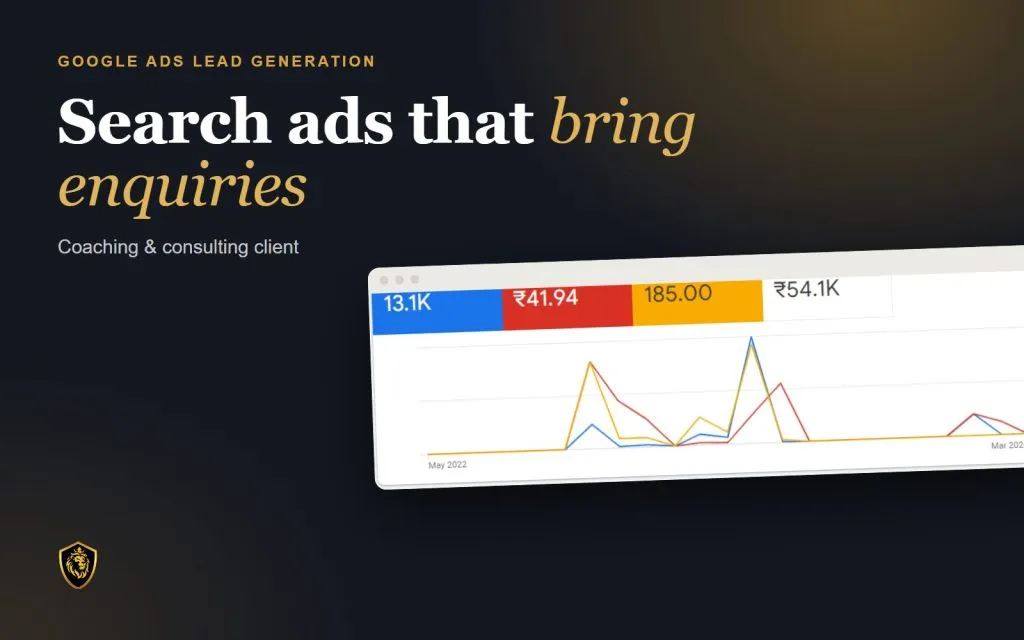
13.1K clicks · 185 lead forms
Coaching & consulting client
Read the storyWho it is for

If ads are not the right next step, we will say so on the strategy call and suggest what to fix first.
Free resource
Before you put more money into Google Ads, check the searches you pay for, the ads, the landing pages and the tracking. This practical PDF checklist walks you through each one, with space to record what you find.
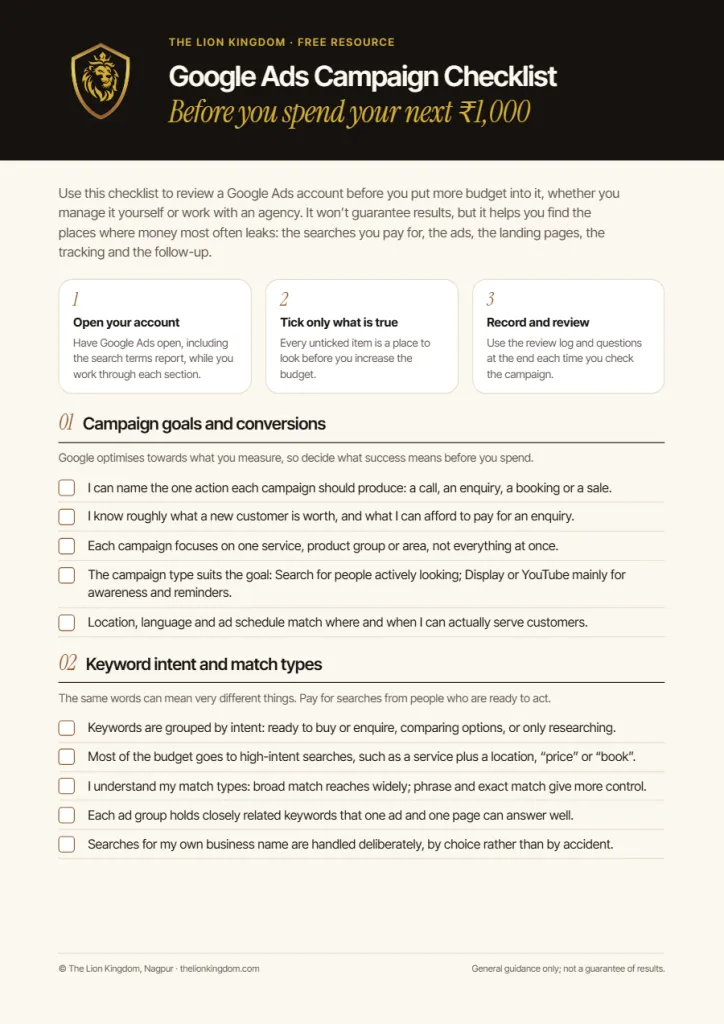
Inside, you will check:
A self-assessment tool, not a guarantee of results.
Enter your details and we will send the checklist to your inbox. No spam: unsubscribe any time.
Free guide
 Free PDF
Maximise your ROI from Google Ads
Keyword filtering, negative keywords, clickable ad examples and landing-page tips to cut wasted spend.
How we work
01
We learn your services, customers, areas served and goals, and what has or hasn’t worked so far.
02
We research what your customers search for, check any existing search terms, and separate high-intent searches from irrelevant ones.
03
We plan campaign structure, keywords, negative keywords and ads, and recommend landing pages that match each group of searches.
04
Campaigns go live within the agreed scope, with conversion tracking in place before spend increases.
05
We review search terms, enquiries and cost per enquiry with you, and recommend what to change next.
The exact steps depend on your starting point and the agreed scope, and are set out in your proposal.
FAQ
They tend to suit businesses whose customers search on Google before they buy or enquire: local services, B2B services and online stores. Search ads reach people at the moment they are looking, and campaigns can start showing once they are approved. If almost nobody searches for what you offer yet, Facebook or LinkedIn, which reach people before they search, may be a better place to start. We will tell you honestly on the strategy call.
Search ads appear when someone types a query into Google, so they reach people who are actively looking. Display ads appear on websites and apps across Google’s network and are better suited to awareness or reminding past visitors. For enquiries we usually start with Search, and add Performance Max, Display or YouTube only where they fit your goals and budget.
Look at how many people search for your services, what clicks cost in your market and what an enquiry is worth to you. The budget needs to be enough to learn from your most important keywords; spreading a small budget across many keywords usually teaches very little. We agree the budget with you before launch. Ad spend is paid directly to Google, separately from our fee.
Common causes are searches that don’t match what you offer, ads that promise something the landing page doesn’t deliver, a slow or confusing page, a weak offer, or enquiries that aren’t being tracked. The free checklist on this page walks through each of these.
Words or phrases you tell Google not to show your ads for. For example, a business selling new furniture might exclude searches containing “second-hand” or “free”. Reviewing the search terms report and adding negative keywords is one of the simplest ways to stop paying for irrelevant clicks.
Yes, if you want to know which keywords and ads bring enquiries rather than only clicks. Conversion tracking also gives Google’s automated bidding the signals it needs. We set it up with the Google tag and Google Analytics before campaigns are scaled.
Not always, but a page that matches the search and the ad usually works better than a homepage. Each group of searches should land on a page that answers that need and makes the next step obvious. We recommend pages where they are needed, and can build them through our website design service.
Our management fee depends on the scope: the number of campaigns and locations, the reporting you need and whether landing pages are involved. After a free strategy call and a look at your account, we send a written proposal with the fee. Ad spend is paid directly to Google and is separate.
Quality Score is a 1–10 rating Google shows for each keyword, based on expected click-through rate, how relevant the ad is to the search, and the landing-page experience. It is a diagnostic, but it reflects the quality signals Google uses when deciding where ads appear and what you pay. Improving the ads and pages can therefore matter as much as raising bids.
Ad position depends on your bids, the quality of your ads and landing page, and competition. We work to improve these, but no one can guarantee a position.
Ask who owns the ad account (it should be your business), how results are reported (enquiries and their cost, not only clicks), how often search terms are reviewed, how the fee is separated from ad spend, and be cautious of anyone who guarantees positions or results. These are the standards we work to.
No, it is free. You enter your name and email to download it. You won’t be added to a mailing list without your separate agreement.
No. Performance depends on your offer, search demand, budget, competition, landing page and how quickly enquiries are followed up, and some of those are outside anyone’s control. We commit to a clear plan, honest reporting and steady improvement.
Related services
Facebook and Instagram campaigns in Meta Ads Manager, built around your buyers, with proper conversion tracking.
LinkedIn campaigns that reach decision-makers by job title, company and industry, with lead forms and proper tracking.
Fast, accessible business websites on WordPress or custom code, built to turn visitors into enquiries.
Start with the free checklist, or book a free 30-minute introductory strategy call and we will look at your account with you. We are a founder-led team in Nagpur: your ad account stays in your name, and you get plain-language reports.